

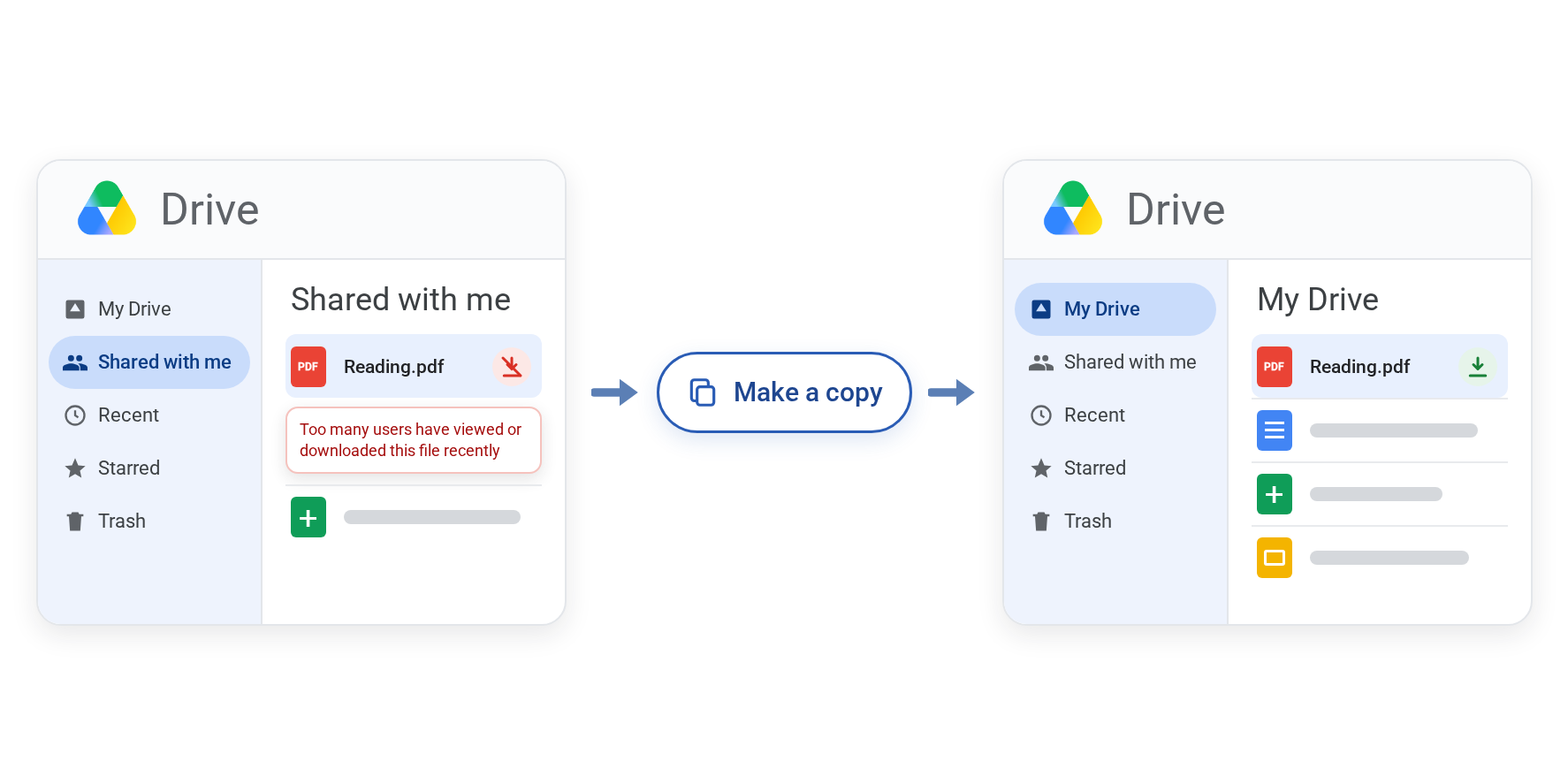
If you see "Download quota exceeded" in Google Drive, it means a shared file has been viewed or downloaded so many times in a short period that Google has paused downloads of it for a while. Google says the block usually lifts within 24 hours. To get around this, you can make your own copy of the file in your Drive and download that instead.
That fix only works while Make a copy is available. If it's grayed out or missing, someone has restricted copying, and that's covered further down.
Common Google Drive errors
| Name of error | Likely cause | What to try first |
|---|---|---|
| "Too many users have viewed or downloaded this file recently" | The file hit a temporary download limit | Make a copy, or wait a day |
| Make a copy grayed out or missing | A copy restriction from the owner, a shared drive or an admin. Or the item is a folder | Check which issue is blocking Make a copy button |
| You're an editor and still can't download, copy or print | Editors can be restricted too, since July 2025 | Ask the owner or your admin |
| "This file cannot be copied by the user" | An undocumented API error, usually a restriction or a folder | Developer notes |
| Nothing downloads at all, even your own files | Your browser: third-party cookies blocked, or an extension getting in the way | Allow cookies for drive.google.com, or turn extensions off |
| "Sorry, you have exceeded your sharing quota" | You shared a lot of files in a short window | Wait, then share in smaller batches |
| Drive says your storage is full, or uploads stop | Storage quota or the daily upload cap, not a download limit | Check which one |
What does "download quota exceeded" mean?
This limit error usually affects a single file only. Google's Download a file help page says the error "occurs when a file receives high view or download volume over a short period." Everything else in your Drive keeps downloading normally.
The message is usually "Too many users have viewed or downloaded this file recently" or "Download quota exceeded for this file," or for API and script errors, you'll see a downloadQuotaExceeded error message.
Google doesn't publish the exact limit, so there's no download count or file size to plan around. This usually affects large videos or publicly available links.
When does the Google Drive download quota reset?
Google says the restriction "typically resets within 24 hours," though some users have reported files still blocked after 48 hours.
Rather than wait the quota restriction out, you can make a copy instead to download it immediately.
How to fix it: make a copy and download that
This is Google's own workaround, and you need at least view access to the file.
- Open Google Drive on your computer and go to Shared with me.
- Right-click the file and choose Make a copy.
- Open My Drive to find the copy.
- Right-click the copy and choose Download.
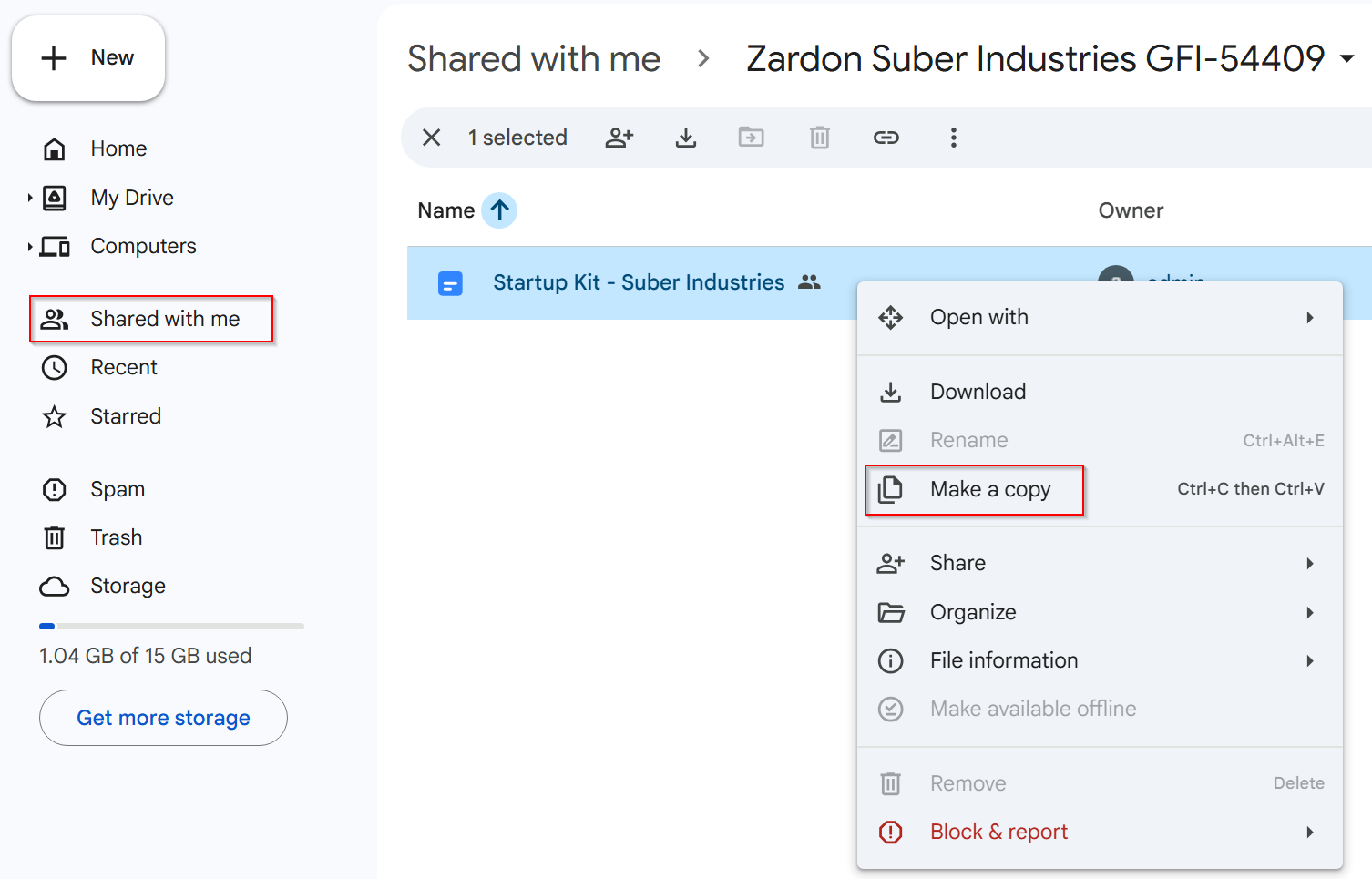
The copy is a new file placed in your My Drive root folder. There are two catches: The copy counts toward your storage, and Make a copy only works on files. To run Make a copy on a whole folder shared with you, FolderPal can help you copy a shared folder.
If you own the file
A file hits the limit because a lot of people open it at once, so the fix is to spread them out. Google suggests sharing with specific Google Groups instead of a public link, and putting large downloads like ZIP archives, media files or installers somewhere built for it, such as Google Cloud Storage. If the file goes out to a class or a client list, giving each group its own copy helps too. You can find more options here.
Can't make a copy? Why, and what to do
When Make a copy is grayed out or missing, it's usually one of four things:
- It's a folder. Drive has no Make a copy for folders, shared or not. Our guide to copying a folder in Google Drive covers the workarounds, where FolderPal can help you do this easily.
- The owner turned it off. Owners can stop people with view or comment access from downloading, printing and copying a file.
- A shared drive setting. Shared drive managers can apply the same kind of restriction.
- An admin rule. On a work or school account, your organization's settings can block downloading and copying, and they override the owner's.
If it's a restriction, no app or script can copy the file for you. They're bound by the same permissions you are. What you can do:
- Ask the owner for a copy, or to switch the restriction off for you.
- On a work or school account, ask your admin whether a policy is blocking it.
Editors can be blocked too
Until mid-2025, owners could only restrict viewers and commenters. Google changed that in a rollout that started on July 8, 2025. Owners and shared drive managers can now stop editors from copying, downloading and printing as well. Editors can still edit the file, but copy and paste only works inside the document. If your admin has set a rule, it wins over the owner's setting.
So the old advice to "ask for edit access" doesn't always work anymore. Google's Download a file page still only mentions people "with only comment or view access," though its sharing help now covers restricting editors too.
Turning copy restrictions on or off
If you own the file, you control this from the share settings:
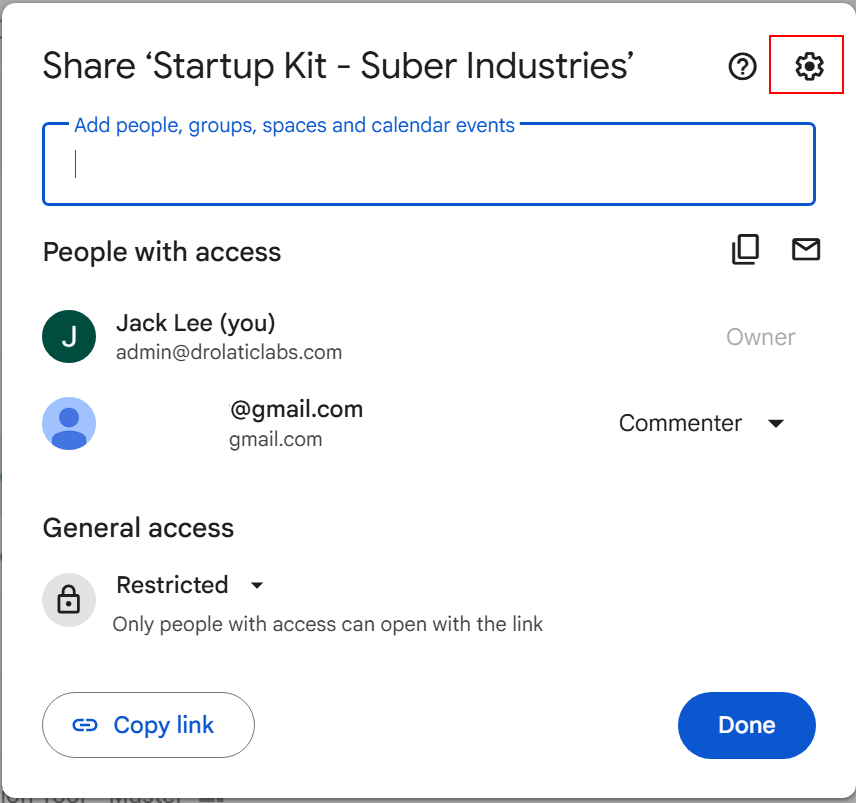
- Open the file's Share menu.
- Click Settings (the gear icon).
- Under People who can download, copy, print and access via Gemini, uncheck the roles you want to block: editors, or commenters and viewers. Check them again to lift the restriction.
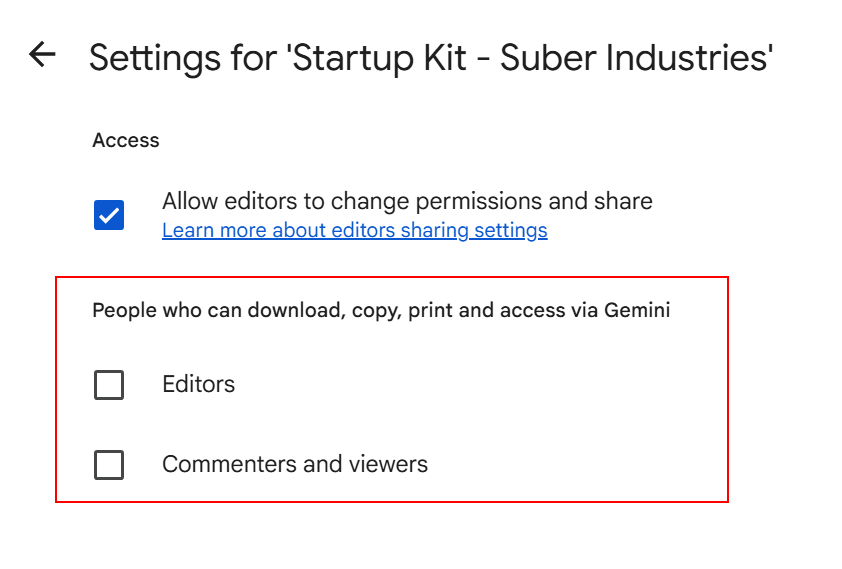
Leaving copying on for viewers gives people the standard fix when the file hits its download quota. With it off, they'll have to wait or come to you. Google's sharing help has the full settings.
Sorry, you have exceeded your sharing quota
This one is tied to your account. It shows up after you share, or transfer ownership of, a lot of files in a short window (University of Michigan IT has a short write-up). Google doesn't publish the threshold, so there's no exact science.
Spread your sharing out over the day, and try sharing in smaller batches. Sharing one folder instead of many files means fewer sharing actions as well. In the API, this issue is the sharingRateLimitExceeded error, which Google says is "often linked with an email limit," so turn off notification emails when you're sharing in bulk.
A shared folder you can see but can't open
Folder owners and shared drive managers can turn off inherited access on a folder, which Google calls limited access. If you only had access through a parent folder, you'll still see the folder but can't open it.
Copy tools hit the same wall. They can't list what's inside, so depending on the tool they'll skip the folder, stop, or create it empty. The owner needs to add you to that folder directly.
Download quota vs storage quota
"Quota exceeded" gets used for a few different Google limits:
- Download quota is per file and temporary, which we covered above.
- Storage quota is your account's space, shared across Drive, Gmail and Photos. When it's full, you can't upload or create files in Drive. Google's storage page covers freeing space or buying more. To find which of your files take up the most room, see clearing out what you don't need in our guide to organizing Google Drive.
- The daily upload limit lets each user upload and copy 750 GB every 24 hours across My Drive and shared drives. Copies count, which matters if you're copying a lot of large files to get past download limits. Consider using shortcuts instead within your Drive to reference identical files, as shortcuts take zero space. A shortcut opens the original file, though, so it won't get you past a download quota.
For developers: downloadQuotaExceeded and cannotCopyFile
Neither error is in Google's Drive API error reference, but both are well reported. Here they are next to the documented errors you're likely to hit nearby:
| Reason | Status | Message | What to do |
|---|---|---|---|
| downloadQuotaExceeded | 403 | "The download quota for this file has been exceeded." Reported, not documented. | Stop and try later |
| cannotCopyFile | 403 | "This file cannot be copied by the user." Reported, not documented. | See below |
| insufficientFilePermissions | 403 | "The user does not have sufficient permissions for file {fileId}." | The owner or an admin has to change access |
| storageQuotaExceeded | 403 | "The user's Drive storage quota has been exceeded." | Free up space or write somewhere else |
| sharingRateLimitExceeded | 403 | "Rate limit exceeded." | Slow down and skip notification emails |
| notFound | 404 | "File not found {fileId}" | The file doesn't exist or the user can't read it. For shared drive files with files.get, set supportsAllDrives=true |
| rateLimitExceeded, userRateLimitExceeded | 403 or 429 | "Rate Limit Exceeded", "User Rate Limit Exceeded" | Exponential backoff, or other tactics |
What causes cannotCopyFile
cannotCopyFile is tricky to resolve, as reports point to three different causes:
- A copy restriction, the explanation a Zapier partner gave in this thread.
- A folder. The Drive API can't copy folders, and this GitHub issue hit the same error.
- A file reached through a shortcut, seen in one unresolved rclone thread.
Check mimeType, resolve shortcuts to their target, and look at capabilities.canCopy before calling copy, rather than guessing from the error afterwards.
A few things that help:
- Check
capabilities.canDownloadandcapabilities.canCopybefore acting. Google's download guide recommends checkingcanDownloadfirst. - For restriction details, read
downloadRestrictions.itemDownloadRestrictionis what the owner set, and the read-onlyeffectiveDownloadRestrictionWithContextalso accounts for shared drive settings and DLP rules. Google recommends this field over the oldercopyRequiresWriterPermissionand warns against setting both. - Folders have to be rebuilt: create each folder, then copy the files into it, level by level. At any real size you'll run into Drive API rate limits and, in Apps Script, execution quotas.
- Match the retry to the error. Permission and copy errors need the owner or an admin to change something, a download quota needs time, and storage needs space. Exponential backoff is for rate limits and 5xx errors, which is where Google's reference recommends it.
Common questions about download quota exceeded
What is the Google Drive download quota limit?
There's no published number. Google only describes it as high view or download traffic over a short period.
How long does download quota exceeded last?
Usually less than a day. Some API users have reported blocks lasting more than 48 hours.
Why won't Google Docs let me make a copy?
Either it's a folder, or copying has been turned off by the owner, a shared drive setting or your admin. Here's how to tell.
Can viewers make a copy of a Google Drive file?
Yes, unless the owner has turned it off. Since 2025, owners can turn it off for editors too.
Can the owner see if I made a copy?
Not as a regular owner. On a Google Workspace account, admins with audit privileges can see a Source Copy event on the original file in the Drive audit log.
Is there a way to bypass the download quota?
Making a copy is the workaround Google itself suggests. Beyond that, wait, or ask the owner for direct access or a fresh copy.
If you share files: stop people hitting these limits
If you're the teacher, course creator or agency sending files out, most of this can be headed off before anyone emails you about it.
- Give each class, cohort or client their own copy. Downloads get spread across separate files, so no single file takes all the traffic. Google doesn't promise this avoids the limit, but it's the same idea as its own Make a copy fix.
- Share with people or groups, not public links. Google suggests the same.
- Decide who can download and copy on purpose, editors included. A restriction nobody remembers turning on is what turns a one-day quota block into a stuck class.
- Share a folder rather than dozens of single files. Fewer share actions means less chance of hitting the sharing quota.
- Use limited-access folders only where you mean to.
FolderPal helps you duplicate and distribute folders and files with folder templates: you set up the folder once, then generate a copy for each class or client, named and already shared with the right people. Drive's permissions and Google's limits still apply to every copy. Alternatively, you can just copy a folder shared with you entirely, including all subfolders and files, to your own Drive (files the owner has blocked from copying are skipped). See how it works for teachers and for client onboarding, or get started free.